Digital Declutter for 2026: 6 Productivity Tools to Save 2 Hours Weekly

Digital Declutter for 2026: How 6 Productivity Tools Can Save You 2 Hours Per Week, Starting Today
In an increasingly interconnected world, where our lives are intertwined with countless digital platforms, the concept of a ‘digital declutter’ has never been more relevant. As we stride into 2026, the sheer volume of information, notifications, and tasks vying for our attention can feel overwhelming. This digital chaos isn’t just a nuisance; it’s a significant drain on our productivity, focus, and overall well-being. Imagine reclaiming at least two hours of your precious time every single week, simply by implementing effective digital declutter strategies and leveraging the right productivity tools. This isn’t a pipe dream; it’s an achievable reality.
The promise of a more organized, less stressful digital life is compelling. But how do you actually get there? This comprehensive guide will walk you through the essential principles of digital decluttering and introduce you to six powerful productivity tools designed to help you achieve significant time savings and enhanced focus. We’ll explore how these tools, when integrated into your daily routine, can transform your digital landscape from a source of distraction into a wellspring of efficiency. Get ready to embark on a journey that will not only streamline your digital life but also empower you to accomplish more with less effort, starting today.
Understanding the Digital Overload: Why a Digital Declutter is Crucial for 2026
Before diving into solutions, it’s vital to understand the root cause of our digital woes. Digital overload isn’t just about having too many apps; it’s about the cognitive burden that comes with constant connectivity, endless notifications, and the perpetual feeling that we need to be ‘on’ all the time. Our brains are simply not wired to process the sheer volume of digital stimuli we encounter daily. This leads to decreased attention spans, increased stress levels, and a significant drop in productivity.
Think about your typical day. How many times do you check your email? How often does a notification pull you away from a focused task? How much time do you spend searching for a file that you know is ‘somewhere’ on your computer or in your cloud storage? These seemingly small interruptions and inefficiencies accumulate, silently eroding your time and mental energy. By the end of the week, these fragmented moments can easily add up to several hours – hours that could have been spent on more meaningful work, personal development, or simply relaxing.
The Silent Productivity Killer: Multitasking and Context Switching
One of the biggest culprits of digital inefficiency is the myth of multitasking. While we often feel productive juggling multiple digital tasks simultaneously, research consistently shows that true multitasking is a myth. What we’re actually doing is ‘context switching’ – rapidly shifting our attention from one task to another. Each switch comes with a ‘switch cost,’ a brief period where our brain has to reorient itself to the new task. These costs, though small individually, compound throughout the day, leading to significant time loss and reduced quality of work. A proper digital declutter helps minimize these switches.
The Mental Load of Digital Clutter
Beyond the time lost, there’s a substantial mental load associated with digital clutter. An overflowing inbox, a desktop littered with unorganized files, and a plethora of unused apps create a subconscious sense of unfinished business. This constant low-level stress can lead to decision fatigue, procrastination, and a general feeling of being overwhelmed. A clean, organized digital environment, conversely, fosters clarity, reduces anxiety, and frees up mental resources for more important tasks. Embracing digital declutter principles is not just about organizing files; it’s about optimizing your cognitive landscape.
The Foundation of Digital Declutter: Core Principles for Lasting Change
Before we introduce specific tools, it’s crucial to establish a foundational mindset for effective digital decluttering. These principles will serve as your guiding stars, ensuring that your efforts lead to sustainable improvements rather than temporary fixes.
Principle 1: Adopt a ‘Less is More’ Philosophy
The first step in any digital declutter is to critically evaluate everything you have. Do you truly need every app on your phone? Every subscription? Every file saved since 2010? The ‘less is more’ philosophy encourages you to ruthlessly eliminate anything that doesn’t serve a clear purpose or bring you value. This applies to files, emails, apps, and even social media accounts.
Principle 2: Create Designated Homes for Everything
Just as you wouldn’t leave your physical belongings scattered randomly, your digital assets need designated homes. This means establishing clear folder structures, consistent naming conventions, and logical organization systems for your files, emails, and digital notes. When everything has a place, you spend less time searching and more time doing.
Principle 3: Automate and Delegate Where Possible
Many repetitive digital tasks can be automated, freeing up your time and reducing the chances of human error. Think about email filtering, file backups, or even scheduling social media posts. Similarly, consider what digital tasks can be delegated or outsourced if they’re not core to your personal or professional objectives.
Principle 4: Schedule Regular Digital Maintenance
Digital decluttering isn’t a one-time event; it’s an ongoing process. Just like you clean your home regularly, you need to schedule regular digital maintenance. This could be a weekly ‘digital cleanup’ session to clear your desktop, an monthly review of your subscriptions, or an annual deep dive into your old files. Consistency is key to preventing clutter from accumulating again.
Principle 5: Be Mindful of Digital Consumption
Finally, cultivating mindfulness around your digital consumption is paramount. Before opening an app, clicking a link, or checking a notification, ask yourself: ‘Is this serving my goals right now?’ By being intentional about your digital interactions, you can significantly reduce distractions and direct your focus towards what truly matters. These principles form the bedrock of an effective digital declutter strategy.
6 Essential Productivity Tools for Your 2026 Digital Declutter
Now that we’ve laid the groundwork, let’s explore six powerful productivity tools that can be instrumental in your digital declutter journey. These tools are selected for their effectiveness in tackling common sources of digital chaos and empowering you to save significant time – at least 2 hours per week.
Tool 1: Email Management – Superhuman (or similar advanced email clients)
The Problem: An overflowing inbox is arguably the most common and persistent source of digital stress. The constant influx of emails, newsletters, and notifications can easily consume hours of your day, diverting your attention from critical tasks. Many traditional email clients, while functional, don’t offer the advanced features needed to truly tame the email beast.
The Solution: Tools like Superhuman revolutionize email management by focusing on speed, keyboard shortcuts, and intelligent categorization. While Superhuman is a premium option, its philosophy can be found in other advanced email clients or even enhanced Gmail/Outlook features. These tools often include:
- AI-powered Triage: Automatically categorizes emails as important, promotional, or social, allowing you to focus on what matters.
- Undo Send & Scheduled Send: Prevents accidental sends and allows you to send emails at optimal times.
- Read Status & Reminders: Ensures you never miss a follow-up and keeps track of important conversations.
- Fast Search & Keyboard Shortcuts: Drastically reduces time spent navigating and searching for specific emails.
- Snippets: Pre-written responses for common queries, saving typing time.
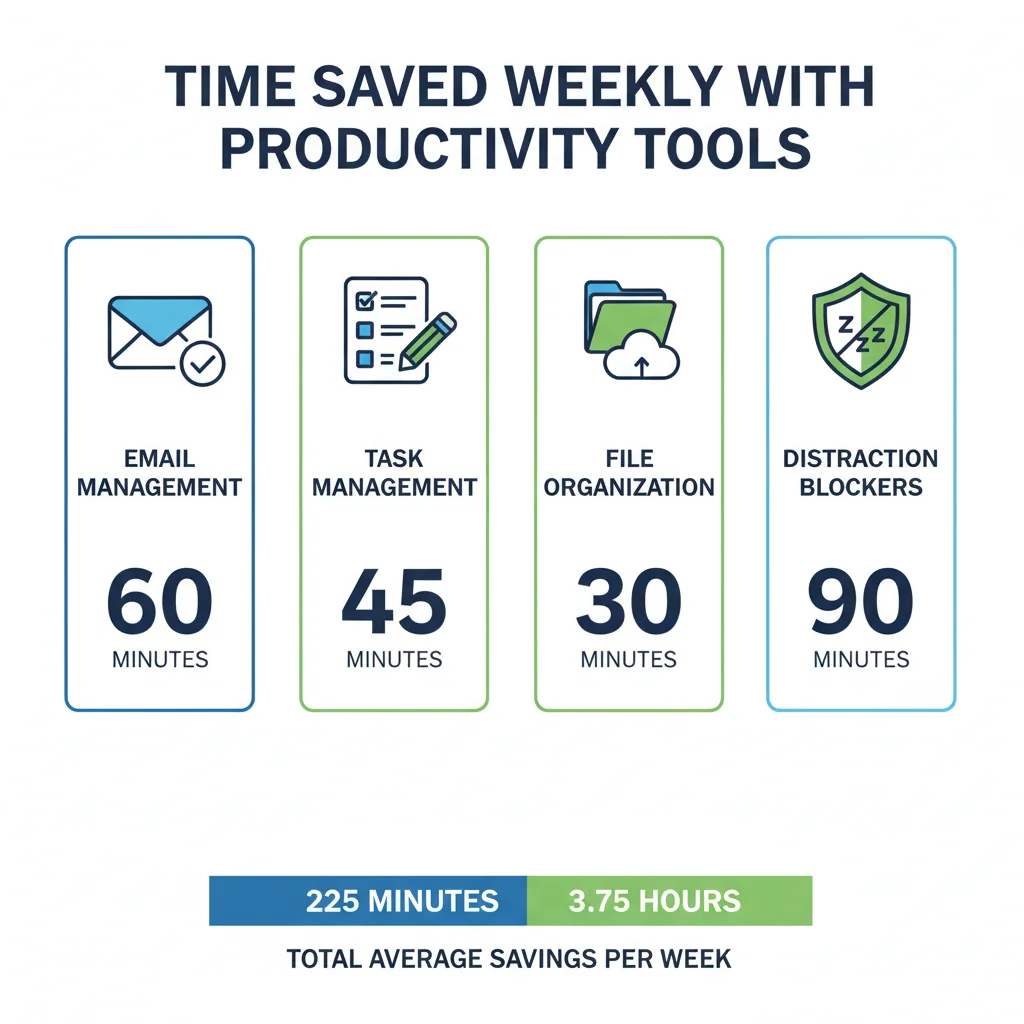
Time Saving Potential: By streamlining your inbox, reducing decision fatigue, and speeding up your email processing, you can easily save 30-60 minutes per week. Less time spent on email means more time for deep work.
Tool 2: Task Management – Todoist (or Asana/Trello for teams)
The Problem: Without a centralized system, tasks can live in various places – sticky notes, random documents, mental lists, or scattered across different apps. This fragmentation leads to forgotten deadlines, duplicated efforts, and a constant feeling of being disorganized. The mental energy spent trying to remember what needs to be done is a huge drain.
The Solution: Todoist is a prime example of a robust task management system that helps you capture, organize, and prioritize all your tasks in one place. Key features include:
- Natural Language Input: Quickly add tasks with due dates and priorities using simple phrases.
- Project Organization: Create dedicated projects for different areas of your life/work.
- Reminders & Recurring Tasks: Ensures you never miss a deadline and automates repetitive tasks.
- Integrations: Connects with calendars, email, and other tools for a seamless workflow.
- Priority Levels: Helps you focus on what’s most important.
Time Saving Potential: By centralizing your tasks and gaining clarity on your priorities, you can eliminate procrastination, reduce forgotten items, and improve overall execution, easily saving 30-45 minutes per week. This digital declutter of your mental to-do list is invaluable.
Tool 3: Note-Taking & Knowledge Management – Obsidian (or Notion/Evernote)
The Problem: Our digital lives are filled with information: meeting notes, research snippets, brilliant ideas, articles to read later. Without a coherent system, this information becomes a jumbled mess, making it difficult to retrieve, connect, and leverage. This digital clutter of knowledge can stifle creativity and hinder learning.
The Solution: Obsidian offers a unique approach to note-taking by creating a ‘second brain’ where your notes are interconnected like a web. While it has a learning curve, its power for knowledge management is immense. Other tools like Notion or Evernote offer similar benefits with different approaches:
- Bi-directional Linking (Obsidian): Connects related notes, revealing insights and fostering new ideas.
- Rich Text Editing & Media Embedding: Capture information in various formats.
- Powerful Search & Tagging: Quickly find any piece of information you’ve ever stored.
- Cross-Device Sync: Access your knowledge base from anywhere.
- Templates: Standardize your note-taking for consistency.
Time Saving Potential: No more searching for that elusive piece of information. By having a well-organized and interconnected knowledge base, you save time on research, recall, and decision-making, potentially saving 20-40 minutes per week. It’s a true digital declutter for your brain.
Tool 4: File Organization & Cloud Storage – Google Drive/OneDrive (with strict folder structures)
The Problem: Our digital files – documents, photos, videos, downloads – can quickly become a chaotic mess across local drives and various cloud services. This disorganization leads to wasted time searching, accidental deletions, and version control issues. A cluttered digital file system is a silent killer of efficiency.
The Solution: While Google Drive and OneDrive are ubiquitous, their true power for digital decluttering comes from disciplined usage. It’s not just about having cloud storage; it’s about how you use it.
- Consistent Folder Hierarchy: Implement a logical, easy-to-understand folder structure (e.g., by project, by date, by client).
- Standardized Naming Conventions: Use consistent file names (e.g., ProjectName_DocType_Date_Version).
- Regular Archiving: Move old or inactive files to an archive folder instead of deleting them outright.
- Version History: Utilize built-in version control to avoid confusion and rework.
- Offline Access & Sync: Ensure critical files are always accessible, even without an internet connection.
Time Saving Potential: No more frantic searches for files or confusion over which document is the latest version. A well-organized cloud storage system can save you 20-30 minutes per week, especially if you deal with many documents. This is a foundational aspect of any digital declutter.
Tool 5: Distraction Blockers – Freedom (or Cold Turkey/StayFocusd)
The Problem: Even with the best intentions, the siren call of social media, news sites, and other distracting websites can be irresistible. These digital temptations break our focus, leading to shallow work and extended task completion times. The average person switches tasks every few minutes, often due to self-interruption from digital distractions.
The Solution: Freedom is a popular multi-device application that allows you to block distracting websites and apps across all your devices – computer, phone, and tablet.
- Customizable Blocklists: Create lists of websites and apps that distract you.
- Scheduled Sessions: Set specific times for blocking, aligning with your work schedule.
- Locked Mode: Prevents you from bypassing the block during a session, enforcing discipline.
- Cross-Device Blocking: Ensures a consistent, distraction-free environment wherever you are.
- Ambient Sounds: Some tools offer focus-enhancing background sounds.
Time Saving Potential: This is where significant time savings can occur. By eliminating digital distractions, you can enter a state of ‘deep work,’ completing tasks faster and with higher quality. Easily save 30-60 minutes per week, or even more, by reclaiming your focus. This is a critical component of a successful digital declutter.
Tool 6: Password Manager – LastPass (or 1Password/Bitwarden)
The Problem: In our digital lives, we have dozens, if not hundreds, of online accounts, each requiring a unique password. Remembering them all is impossible, leading to forgotten passwords, insecure practices (reusing passwords), and wasted time on password resets. This digital chaos around authentication is both a security risk and a productivity drain.
The Solution: A robust password manager like LastPass securely stores all your login credentials, generating strong, unique passwords for each site.
- Secure Password Storage: Encrypts and stores all your passwords in a single vault.
- Automatic Login: Automatically fills in login credentials for websites and apps.
- Password Generator: Creates strong, unique passwords for new accounts.
- Security Audit: Identifies weak or reused passwords and alerts you to potential breaches.
- Secure Sharing: Allows you to securely share passwords with trusted individuals or teams.
Time Saving Potential: No more struggling to remember passwords or going through tedious reset processes. A password manager saves you several minutes every day, adding up to 10-20 minutes per week, while significantly boosting your online security. It’s an often-overlooked but crucial part of a complete digital declutter.

Implementing Your Digital Declutter: A Step-by-Step Action Plan for 2026
Acquiring the tools is only half the battle; integrating them effectively into your routine is where the real magic happens. Here’s a practical, step-by-step plan to kickstart your 2026 digital declutter and start saving those crucial hours.
Step 1: The Digital Audit (Week 1)
Before you organize, you need to know what you have. Dedicate time this week to a comprehensive digital audit:
- Apps: Go through all apps on your phone, tablet, and computer. Delete anything you haven’t used in 90 days or no longer need. Disable notifications for non-essential apps.
- Files: Scan your desktop, downloads folder, and main document folders. Identify files for deletion, archiving, or immediate organization.
- Email: Unsubscribe from unnecessary newsletters. Delete old, irrelevant emails. Create basic folders for immediate sorting.
- Subscriptions: Review all digital subscriptions – streaming services, software, newsletters. Cancel what you don’t use or value.
- Social Media: Review your social media follows. Unfollow accounts that don’t add value or actively distract you.
This initial audit is your first major digital declutter.
Step 2: Install and Configure Core Tools (Week 2-3)
Focus on integrating 1-2 tools at a time to avoid overwhelm.
- Password Manager: Start by installing LastPass (or your chosen alternative). Begin migrating your most frequently used logins. This will yield immediate security and time-saving benefits.
- Task Manager: Set up Todoist. Start by adding all current tasks you can think of. Get into the habit of adding new tasks immediately as they arise.
- Email Client: If using Superhuman, follow their onboarding process. For others, configure filters and rules to automatically sort incoming mail. Aim for ‘Inbox Zero’ by processing emails rather than just reading them.
Step 3: Establish Your Digital Hubs (Week 4-5)
Now, solidify your central digital organization points.
- Cloud Storage: Implement your established folder structure in Google Drive/OneDrive. Start moving and organizing existing files. Make it a habit to save new files directly into their designated folders.
- Note-Taking System: Begin using Obsidian (or Notion/Evernote) for all new notes. Gradually migrate important old notes. Focus on linking related ideas to build your ‘second brain.’
Step 4: Master Focus and Maintenance (Ongoing)
This is where the discipline kicks in for your digital declutter.
- Distraction Blocker: Install and configure Freedom. Start with short blocking sessions during your most critical work periods. Gradually extend the duration as you get comfortable.
- Weekly Review: Dedicate 30-60 minutes each week to ‘digital maintenance.’ Clear your desktop, process any lingering emails, review your task list, and ensure your files are organized.
- Mindful Consumption: Continuously practice asking ‘Is this serving me?’ before engaging with digital content.
By following this phased approach, you’ll build habits and integrate tools without feeling overwhelmed, leading to a sustainable and effective digital declutter.
Measuring Your Success: How to Track Your Time Savings and Increased Productivity
The goal of this digital declutter isn’t just to feel more organized; it’s to genuinely save time and boost your productivity. To truly appreciate the impact, it’s helpful to measure your progress.
Quantitative Metrics:
- Time Tracking: Before starting, consider using a simple time tracking app (like Toggl Track or Clockify) for a week to understand where your time currently goes, especially on email, file searching, and task management. Re-evaluate after a month of using the tools to see tangible reductions.
- Email Processing Time: Note how long it takes you to reach ‘Inbox Zero’ (or process your daily emails) before and after using an advanced email client.
- Task Completion Rate: Track the number of tasks you complete each week. A well-managed task list should lead to higher completion rates.
- Distraction Frequency: If you’re diligent, you’ll notice a significant drop in how often you switch tabs or pick up your phone out of habit once distraction blockers are in place.
Qualitative Metrics:
- Stress Levels: Pay attention to your mental state. Do you feel less overwhelmed? More in control?
- Focus & Concentration: Are you able to concentrate on tasks for longer periods without feeling the urge to check something else?
- Quality of Work: Do you find your work is more thorough, creative, or error-free because you have more dedicated focus?
- Sense of Accomplishment: Do you end your days feeling more accomplished and less drained?
By combining quantitative data with qualitative self-assessment, you’ll gain a holistic understanding of how your digital declutter efforts are paying off, motivating you to maintain these positive changes into 2026 and beyond.
Beyond the Tools: Cultivating a Mindset for Sustainable Digital Productivity
While the tools we’ve discussed are incredibly powerful, they are merely facilitators. The true, lasting impact of a digital declutter comes from cultivating a mindful and intentional approach to your digital life. This isn’t just about saving time; it’s about reclaiming your attention and mental peace.
Embrace Digital Minimalism
Consider adopting principles of digital minimalism. This philosophy, popularized by Cal Newport, advocates for using technology intentionally and only when it serves a deep, meaningful purpose. It’s about curating your digital environment to support your values and goals, rather than allowing it to dictate your attention. Ask yourself: ‘Does this technology add substantial value to my life, or is it merely a distraction?’
Schedule Deep Work Sessions
Once you’ve implemented distraction blockers, actively schedule ‘deep work’ sessions – uninterrupted blocks of time dedicated to cognitively demanding tasks. During these times, turn off all notifications, close irrelevant tabs, and commit fully to the task at hand. This is where the most significant productivity gains occur.
Regular Digital Detoxes
Periodically unplug. This could be an hour each evening, a full day on the weekend, or even a longer vacation without constant connectivity. Digital detoxes reset your brain, improve focus, and help you appreciate life beyond screens. These breaks are crucial for maintaining the benefits of your digital declutter.
Be Patient and Persistent
Changing ingrained digital habits takes time and effort. There will be days when you slip back into old patterns. Don’t get discouraged. Acknowledge the lapse, recommit to your digital declutter principles, and keep moving forward. Every small step towards a more organized and focused digital life contributes to long-term success.
Conclusion: Your Path to a More Productive 2026 Starts Now
The journey to a digitally decluttered and more productive life in 2026 is entirely within your grasp. By understanding the pervasive nature of digital overload, embracing core decluttering principles, and strategically leveraging the six powerful productivity tools outlined in this guide, you can realistically expect to reclaim at least two hours of your week.
Imagine what you could do with that extra time: pursue a passion project, spend more quality time with loved ones, learn a new skill, or simply enjoy moments of quiet reflection. The benefits extend far beyond mere efficiency; they touch every aspect of your well-being, reducing stress, enhancing focus, and fostering a greater sense of control over your digital environment.
Don’t let the digital world dictate your attention and energy any longer. Take the first step today. Choose one tool, implement one principle, and commit to consistent action. Your future, more focused, and productive self in 2026 will thank you for embarking on this essential digital declutter journey. The power to transform your digital habits and reclaim your valuable time is in your hands.